
协议Fuzz工具整合


本文为看雪论坛优秀文章
看雪论坛作者ID:有毒
TL; DR
因为有些论文工具暂时没有包括进来,所以会长期更新完善,争取覆盖掉所有的主流协议fuzz工具。而且针对论文性质的工具,后续会出论文解读的详细内容,该文章中只做工具的整理。
一
AFLNet
1、Description
2、Installation
(1)环境
(2)AFLNet
# First, clone this AFLNet repository to a folder named aflnetgit clone <links to the repository> aflnet# Then move to the source code foldercd aflnetmake clean allcd llvm_mode# The following make command may not work if llvm-config cannot be found# To fix this issue, just set the LLVM_CONFIG env. variable to the specific llvm-config version on your machine# On Ubuntu 18.04, it could be llvm-config-6.0 if you have installed clang using apt-getmake# Move to AFLNet's parent foldercd ../..export AFLNET=$(pwd)/aflnetexport WORKDIR=$(pwd)export PATH=$AFLNET:$PATHexport AFL_PATH=$AFLNET
(3)Usage
afl-fuzz -d -i in -o out -N <server info> -x <dictionary file> -P <protocol> -D 10000 -q 3 -s 3 -E -K -R <executable binary and its arguments (e.g., port number)>-N netinfo:server信息(例如 tcp://127.0.0.1/8554) -P protocol:待测试的应用协议(例如:RTSP, FTP, DTLS12, DNS, DICOM, SMTP, SSH, TLS, DAAP-HTTP, SIP) -D usec:可选,server完全初始化的等待时间,微秒为单位 -K:可选,处理完所有请求消息后,向server发送SIGTERM信号以终止server -E:可选,开启状态感知模式 -R:可选,开启region-level变异 -F:可选,启用假阴性消除模式 -c script:可选,server cleanup的脚本或完整路径 -q algo:可选,状态选择算法(1. RANDOM_SELECTION, 2. ROUND_ROBIN, 3. FAVOR) -s algo:可选,种子选择算法(1. RANDOM_SELECTION, 2. ROUND_ROBIN, 3. FAVOR)
(4)Example
Server和client的编译和安装
cd $WORKDIR# Clone live555 repositorygit clone https://github.com/rgaufman/live555.git# Move to the foldercd live555# Checkout the buggy version of Live555git checkout ceeb4f4# Apply a patch. See the detailed explanation for the patch belowpatch -p1 < $AFLNET/tutorials/live555/ceeb4f4.patch# Generate Makefile./genMakefiles linux# Compile the sourcemake clean all
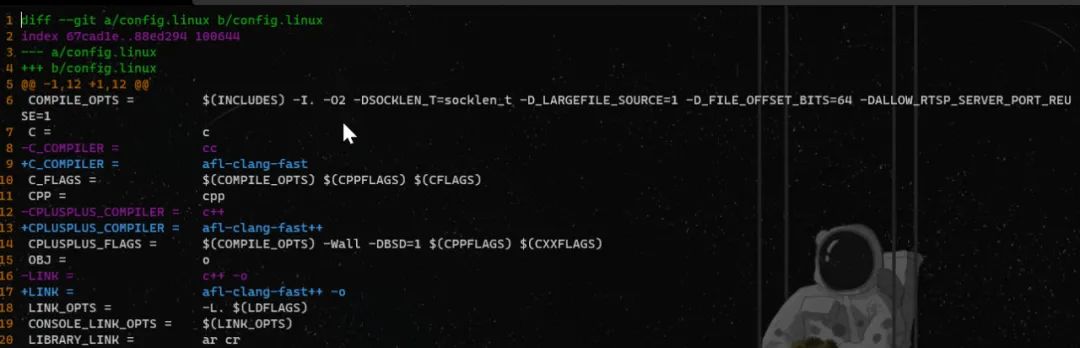
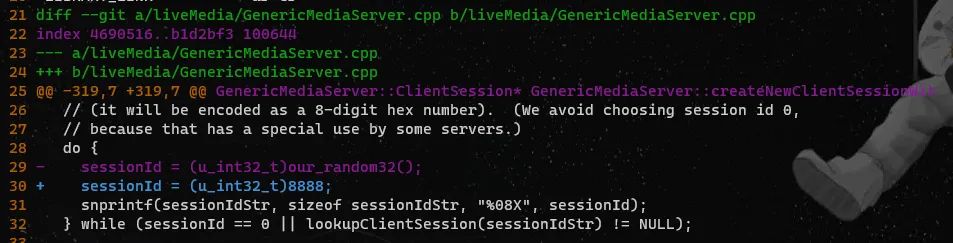
# Move to the folder keeping the RTSP server and clientcd $WORKDIR/live555/testProgs# Copy sample media source files to the server foldercp $AFLNET/tutorials/live555/sample_media_sources/*.* ./# Run the RTSP server on port 8554./testOnDemandRTSPServer 8554# Run the sample client on another screen/terminal./testRTSPClient rtsp://127.0.0.1:8554/wavAudioTest

① 准备种子
cd $WORKDIR/live555/testProgs./testOnDemandRTSPServer 8554
tcpdump -w rtsp.pcap -i lo port 8554./testRTSPClient rtsp://127.0.0.1:8554/wavAudioTest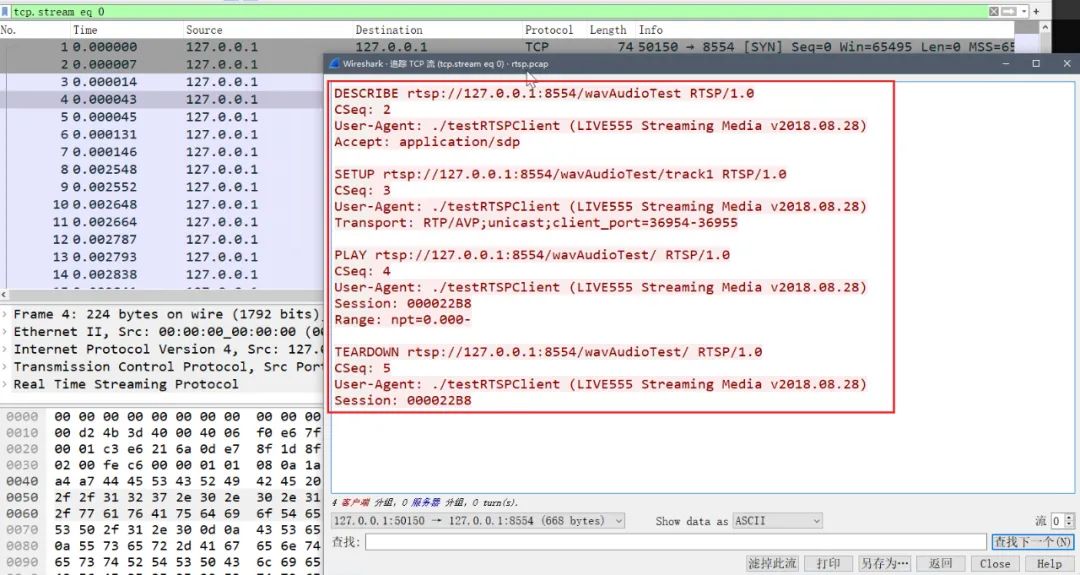

② 进行fuzz
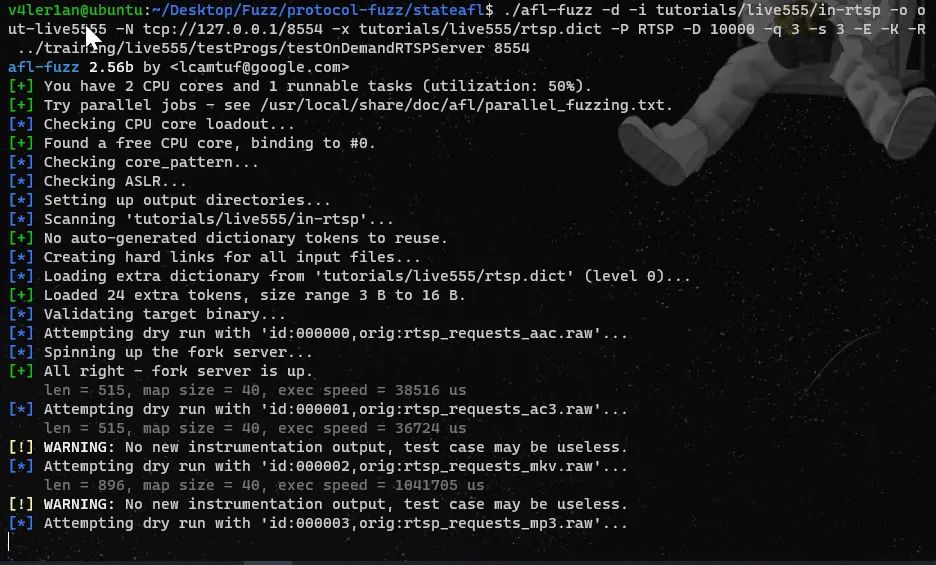
cd $WORKDIR/live555/testProgsafl-fuzz -d -i $AFLNET/tutorials/live555/in-rtsp -o out-live555 -N tcp://127.0.0.1/8554 -x $AFLNET/tutorials/live555/rtsp.dict -P RTSP -D 10000 -q 3 -s 3 -E -K -R ./testOnDemandRTSPServer 8554


③ crash重现
./afl-replay tutorials/live555/CVE_2019_7314.poc RTSP 8554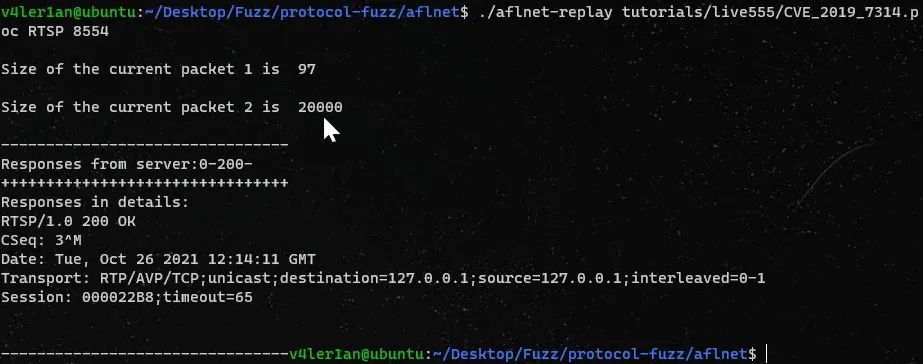
二
StateAFL
1、Description
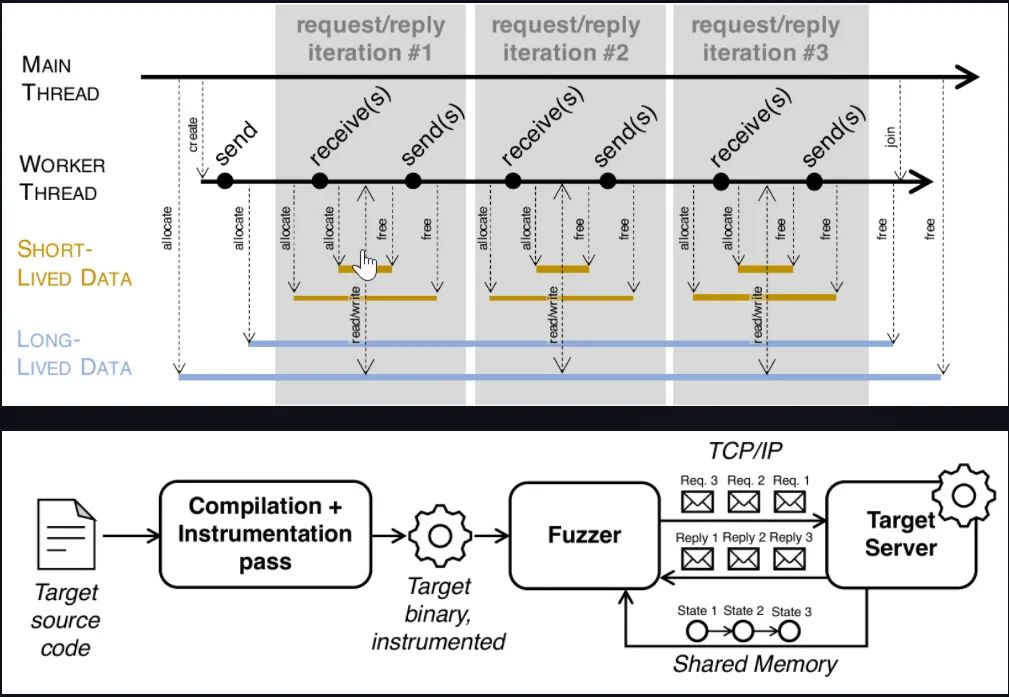
2、Installation
# Install clang (required by afl-clang-fast)sudo apt-get install clang# Install graphviz developmentsudo apt-get install graphviz-dev# First, clone this StateAFL repository to a folder named stateaflgit clone <links to the repository> stateafl# Then move to the source code foldercd stateaflmake clean allcd llvm_mode# The following make command may not work if llvm-config cannot be found# To fix this issue, just set the LLVM_CONFIG env. variable to the specific llvm-config version on your machine# On Ubuntu 18.04, it could be llvm-config-6.0 if you have installed clang using apt-getmake# Move to StateAFL's parent foldercd ../..export STATEAFL=$(pwd)/stateafl
3、Usage
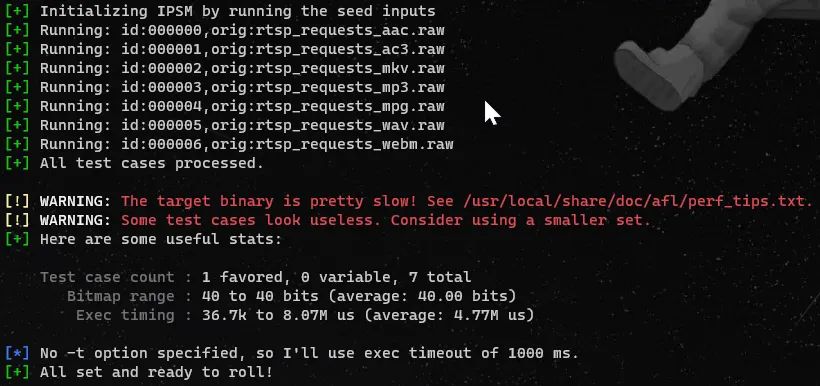
4、Example
三
ProFuzzBench
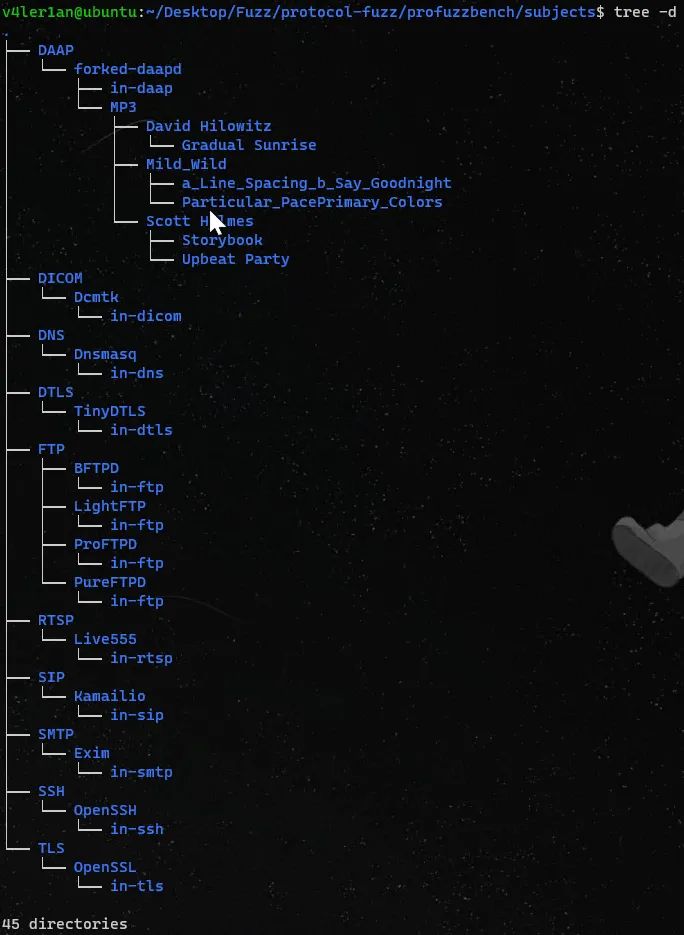
protocol-fuzzing-benchmark├── subjects: this folder contains all protocols included in this benchmark and│ │ each protocol may have more than one target server│ └── RTSP│ └── FTP│ │ └── LightFTP│ │ └── Dockerfile: subject-specific Dockerfile│ │ └── run.sh: (subject-specific) main script to run experiment inside a container│ │ └── cov_script.sh: (subject-specific) script to do code coverage analysis│ │ └── other files (e.g., patches, other subject-specific scripts)│ └── ...└── scripts: this folder contains all scripts to run experiments, collect & analyze results│ └── execution│ │ └── profuzzbench_exec_common.sh: main script to spawn containers and run experiments on them│ │ └── ...│ └── analysis│ └── profuzzbench_generate_csv.sh: this script collect code coverage results from different runs│ └── profuzzbench_plot.py: sample script for plotting└── README.md
Installation and Setup
git clone https://github.com/profuzzbench/profuzzbench.gitcd profuzzbenchexport PFBENCH=$(pwd)export PATH=$PATH:$PFBENCH/scripts/execution:$PFBENCH/scripts/analysis
cd $PFBENCHcd subjects/FTP/LightFTPdocker build . -t lightftp# 为了提高build效率,可以使用以下命令:# docker build . -t lightftp --build-arg -j4# 使用StateAFL时,使用的是额外定制Dockfile:Dockerfile-stateafl,所以使用的build命令需要指明使用的dockerfiledocker build . -f Dockerfile-stateafl -t lightftp-stateafl
1、Run Fuzzing
Docimage:指定docker image Runs:runs的实例数,每个container跑一个fuzz过程,类似于并行fuzz Saveto:结果的保存路径 Fuzzer:指定使用的fuzzer name Outdir:docker container中创建的output文件夹名称 Options:除了目标特定的 run.sh 脚本中编写的标准选项之外,fuzz所需的所有选项 Timeout:fuzz时长,秒为单位 Skipcount:用于计算覆盖率时间,例如Skipcount=5就是说每5个test case后执行一次gcov
cd $PFBENCHmkdir results-lightftpprofuzzbench_exec_common.sh lightftp 4 results-lightftp aflnet out-lightftp-aflnet "-P FTP -D 10000 -q 3 -s 3 -E -K" 3600 5 &profuzzbench_exec_common.sh lightftp 4 results-lightftp aflnwe out-lightftp-aflnwe "-D 10000 -K" 3600 5

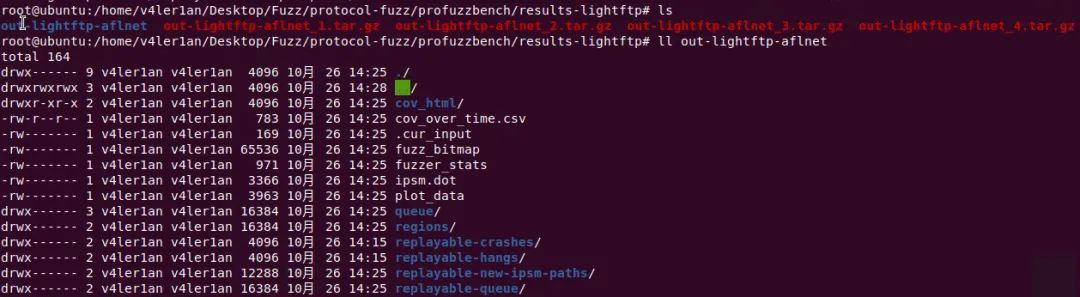

2、Collect the results
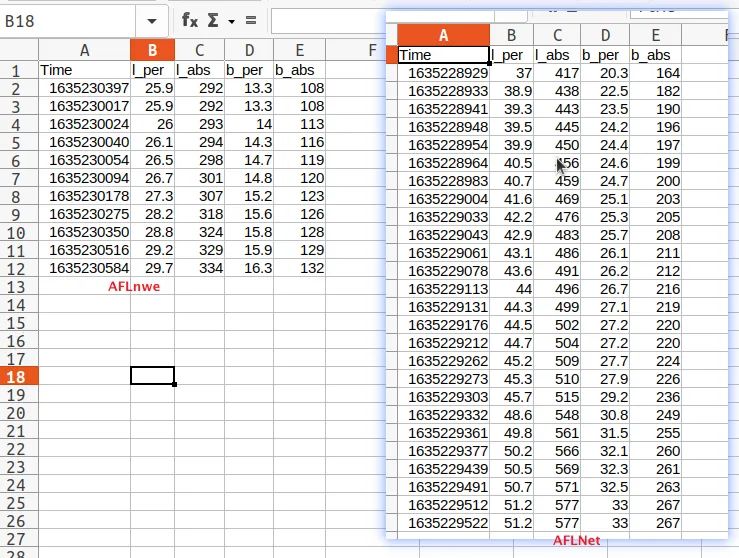
prog:subject program的名字,例如lightftp runs:runs数量 fuzzer:fuzzer的name,例如AFLNet covfile:CSV格式的输出文件 append:append模式
cd $PFBENCH/results-lightftpprofuzzbench_generate_csv.sh lightftp 4 aflnet results.csv 0profuzzbench_generate_csv.sh lightftp 4 aflnwe results.csv 1

3、Analysis the results
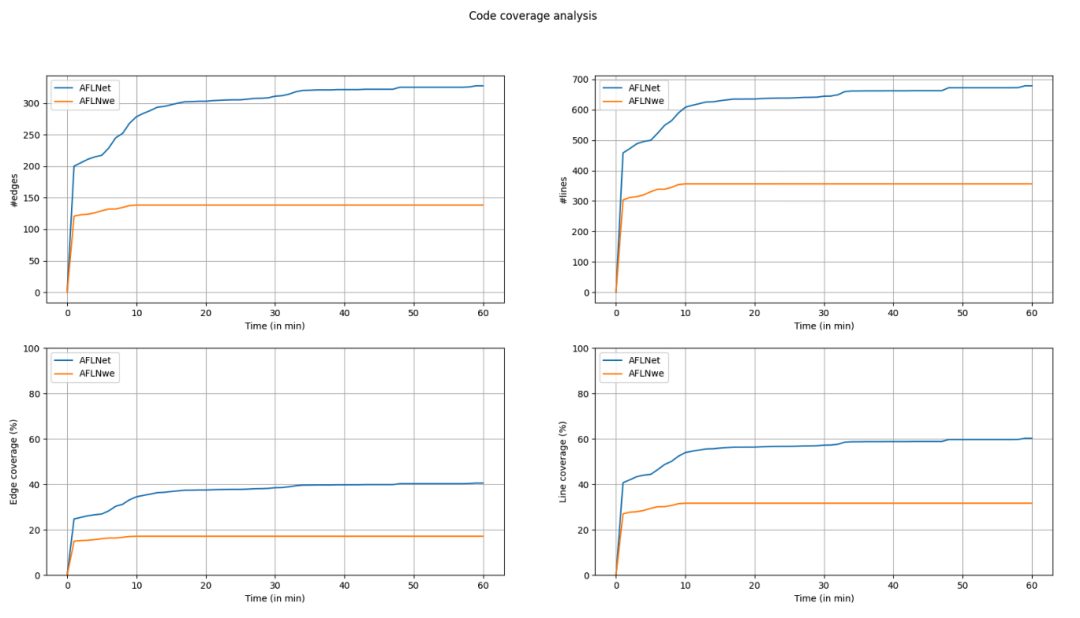
cd $PFBENCH/results-lightftpprofuzzbench_plot.py -i results.csv -p lightftp -r 4 -c 60 -s 1 -o cov_over_time.png
4、Conclusion

看雪ID:有毒
https://bbs.pediy.com/user-home-779730.htm


# 往期推荐
1.通过ObRegisterCallbacks学习对象监控与反对象监控


球分享
球点赞
球在看

点击“阅读原文”,了解更多!
[广告]赞助链接:
关注数据与安全,洞悉企业级服务市场:https://www.ijiandao.com/
让资讯触达的更精准有趣:https://www.0xu.cn/
 关注KnowSafe微信公众号
随时掌握互联网精彩
- Kairos 3.0 – 大晓机器人开源的商业应用世界模型
- Apache Tomcat发布安全更新 借CVE-2024-56337可远程代码执行
- 尊云,简单好用且价格厚道的云服务器提供商
- 点可云基于ThinkPHP和Layui技术栈开发的全功能企业管理软件。
- HEXONET如何PUSH域名?
- 一举两得:支持双数据连接的全新第二代高通双卡双通,释放5G蜂窝技术双连接的全部潜能
- ofo小黄车已彻底无法登录;初代 iPhone 拍出 6.3 万美元天价;Linux 6.3 合并了硬件噪声工具|极客头条
- 颠覆了计算机格局的“牵牛星” | 历史上的今天
- Linux 内核支持 Rust;中科院计划每半年升级一次 RISC-V 芯片;Python 3.10.1 发布 | 开源日报
- 官宣!前微软研发经理邹欣加入 CSDN 担任副总裁,CSDN 重磅招揽一流人才
- 盘点|2020各省市网络安全园区建设与扶持政策
- CSDN湘苗培优,遇见更好的自己
赞助链接